
1. What is the core functionality demonstrated in this demo?
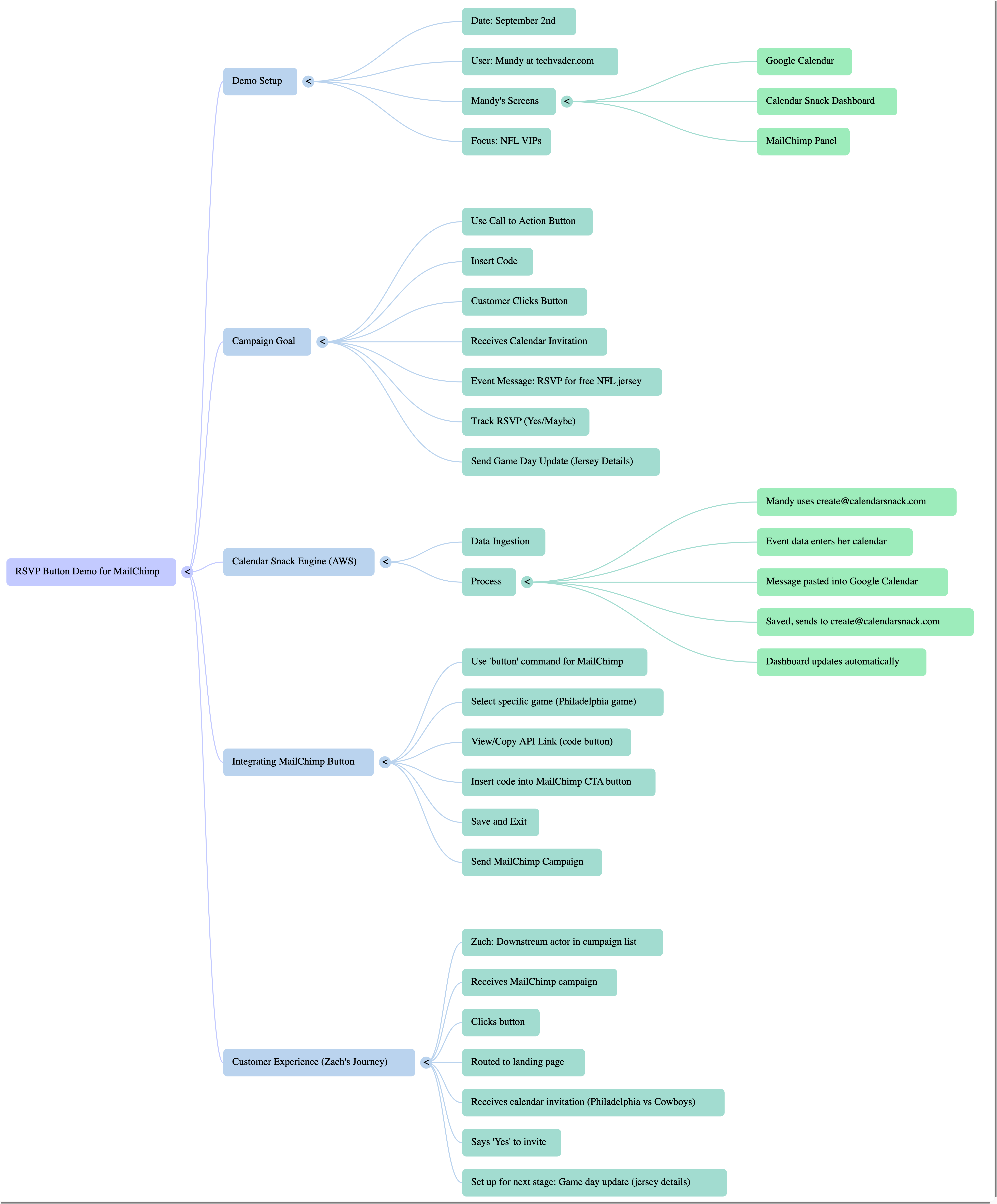
The demo showcases how to integrate an RSVP button within a Mailchimp campaign to generate and send personalized calendar invitations to recipients automatically.
When a recipient clicks the button in the Mailchimp email, they receive a calendar invite for a specific event, and their response (Yes/No/Maybe) is tracked by the Organizer, Mandy.
2. What are the key tools or platforms used in this integration?
The leading platforms involved are Mailchimp for sending email campaigns, Google Calendar for event scheduling, and "Calendar Snack" (or "Calendar Snack Engine"), which appears to be the central system facilitating the creation and tracking of calendar invites. The Calendar Snack engine runs on an AWS server and serves as the RSVP Button generator.
3. How does event information get into the Calendar Snack system?
The demo explains that event data is input by sending an email with the event details to create@calendersnack.com from the organizer's (Mandy's) calendar. This "create command" automatically populates the event information within the Calendar Snack dashboard.
4. How is the RSVP button linked to the calendar invitation?
After the event is created in Calendar Snack, the system generates a unique piece of code for the RSVP button. This code is then copied and pasted into the call-to-action button within the Mailchimp campaign builder. When a recipient clicks this button in the Mailchimp email, it triggers the delivery of the calendar invitation.
5. What happens after a recipient RSVPs to the calendar invitation?
The demo highlights that the system tracks the recipient's response (e.g., "Yes" or "Maybe"). This tracking is crucial for the next stage of the campaign. For instance, in the NFL VIP example, those who RSVP positively will receive a subsequent calendar update on "game day" with details on how to claim their free NFL jersey.
6. Can you give an example of a specific campaign described in the demo?
The demo uses an NFL VIP campaign as its primary example. The offer is for NFL VIPs to receive a free $125 NFL jersey. Recipients who click the RSVP button, receive the calendar invite, and respond with "Yes" or "Maybe" will then receive a game-day update with information on where to pick up their jersey.
7. What is the benefit of integrating Mailchimp with Calendar Snack in this way?
This integration streamlines the process of inviting people to events and tracking their attendance. It automates the creation and distribution of calendar invites directly from an email campaign, eliminating manual steps and providing data on recipient engagement with the event.
8. How does the system ensure the recipient receives the calendar invitation after clicking the Mailchimp button?
When a recipient clicks the button in the Mailchimp campaign, they are redirected to a landing page (although the demo quickly shifts focus away from this). More importantly, in parallel, they receive the actual calendar invitation in their email inbox, which they can then accept to add to their personal calendar.